 |
Home |  |
Using DataLoad | |
Macro Loads |  |
Browser Control | |
Forms Playback | |
Scripting | |
Problems |  |

Step Mode is used to test loads or diagnose problems with the load. When Step Mode is used DataLoad waits after each cell is processed and only continues with the load when requested by the user. The user can then request that the load continues in Step Mode, it runs normally to completion or that the load is cancelled.
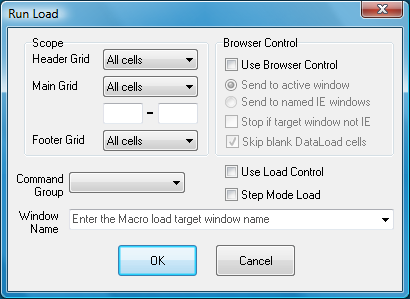
To enable step mode ensure "Step Mode loading" is selected on the start load dialog box, which is shown below:
When a Macro is run in Step Mode DataLoad will display the following message after processing each cell:
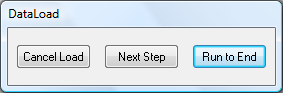
To stop the load at that point click "Cancel Load", to process the next step (cell) of the load click "Next Step" and to run the remainder of the load without Step Mode click "Run to End".
By running a load one step at a time the effectiveness and result of each step in the load can be tested. This makes it easier to test the effects of each step of the load than is possible by just slowing the speed of the load with delays.