 |
Home |  |
Using DataLoad | |
Macro Loads |  |
Browser Control | |
Forms Playback | |
Scripting | |
Problems |  |

 Put the cursor in the correct field in the target application Select
a window in the Window name drop list Select
a Command Group Start the
load Press Esc
to stop the load at any time
Put the cursor in the correct field in the target application Select
a window in the Window name drop list Select
a Command Group Start the
load Press Esc
to stop the load at any time Before a Macro load runs the target application must be open and the cursor located in the first field to be used in the load. The load is then started by selecting the Tools -> Start Load menu or by pressing the toolbar icon. The window shown below will appear. The load parameters are specified in this window and the load will start when the OK button is pressed.
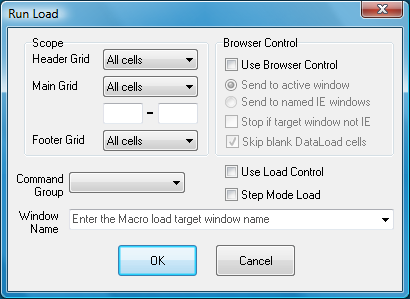
The Run Load window contains the following fields:
Header Grid - Drop list that controls what cells from the Header grid are loaded. This may be set to load all cells, just the selected cells or no cells.
Main Grid - Drop list that controls what cells from the Main grid are loaded. This may be set to load all cells, just the selected cells, no cells or cells in the range of rows specified in the fields below this drop list.
Footer Grid - Drop list that controls what cells from the Footer grid are loaded. This may be set to load all cells, just the selected cells or no cells.
Window Name - Drop list to select the name of the window to receive the data and commands. The window name is set on the main DataLoad toolbar but the name can also be specified in this drop list.
Command Group - The Command Group may be set here if it was not set on the main DataLoad window or the Command Group must be changed. The Command Group ensures the correct command definitions are used in the load.
Use Load Control - Controls whether Load Control is used.
Step Mode Load - Controls whether the load runs in Step Mode mode.
If Browser Control is licensed then the Browser Control fields will be enabled. These are:
Use Browser Control - If ticked, Browser Control will be used whenever the target is an Internet Explorer window.
Send to active window - This is the normal way DataLoad Macro loads work and the target window is the active or foreground window. DataLoad will send data to this window when this option is selected.
Send to named IE windows - When this option is used DataLoad will control specific, named Internet Explorer windows instead of the active window. The first window will be the window selected in the Window Name drop list. The target window can be changed during the load by using the *CW() command. This option is only available with Browser Control and this means the target window must always be Internet Explorer. Furthermore, the load must consist entirely of data and click commands and keystrokes, for example, cannot be used. However, for suitable loads this is the most reliable option and enables the user to work in other windows while the load is running.
Stop if target window not IE - If selected, the Browser Control load will stop if the target window is not an Internet Explorer window.
Skip blank DataLoad cells - If selected (the default), empty cells are ignored during the load. When not ticked DataLoad will attempt to clear the corresponding browser field. To have DataLoad clear a browser field when this checkbox is ticked *CLEAR should be entered in the DataLoad cell.
When the load is ready to test either all cells in the spreadsheet may be loaded or just a limited selection. This latter option is useful for testing or debugging just a small, new or complicated part of the load.
When the load is complete DataLoad will return to being the active window and will display how many records were processed and in what elapsed time.
It is sometimes necessary to stop the load before it is complete. This can be achieved by pressing the 'ESC' (Escape) key. DataLoad will stop once the current command is complete. For that reason it may not finish immediately, however in this situation it is not necessary to repeatedly press ESC or hold the key down.