 |
Home |  |
Using DataLoad | |
Macro Loads | |
Browser Control | |
Forms Playback | |
Scripting | |
Problems |  |

This page contains answers to many of the most commonly asked questions about DataLoad. It is organised into the following three sections:
General DataLoad Questions
Scripting
Forms Playback
Macro Loads
Q. Is DataLoad really free?
A. There are two versions of DataLoad - Classic and Professional. Classic is completely free of any charges to download, distribute and use. It provides the Macro loads for simple data loading. No support is provided for users of DataLoad Classic. DataLoad Professional provides faster and more reliable loads with better error handling via Browser Control, Scripting and Forms Playback. These loads are significantly faster than Macro loads and Scripting can be used to add significant custom functionality, e.g. custom validation or extracting data from external sources. Customers who purchase Professional also receive comprehensive support.
Q. Can I use DataLoad with Oracle E-Business Suite (11i, R12, R12.1, R12.2), Oracle Cloud Applications, SAP, etc?
A. DataLoad works with any business applications you can access from a PC and contains enhancements for use with Oracle E-Business Suite and Oracle Cloud Applications. DataLoad has been successfully tested with all current versions of Oracle E-Business Suite. As new versions of Oracle's business applications are released DataLoad is tested with these releases to ensure continued support. Full R12.x compatibility was added in DataLoad V4.3.9.0.
Q. DataLoad doesn't work with Oracle Cloud Applications (Fusion), does it?
A. Yes! See answer to previous question - DataLoad (Classic & Professional) not only works with Oracle Cloud Applications but DataLoad Professional includes specialist functionality to improve Cloud data loads, e.g. Browser Contol.
Q. Can I use DataLoad with Windows 10, etc?
A. Yes, DataLoad has been extensively tested with the latest versions of Windows and can be used without any issues.
Q. Is there a version of DataLoad for Mac or Linux?
A. At present DataLoad is only available for the Windows platform, although it can load data in to systems hosted on any other operating system. We produce DataLoad for Windows because this is the desktop operating system used by most of our customers. If in future our customers increase their use of Macs, Linux or other desktop OSes then we will review whether DataLoad should also be developed for those OSes.
Q. Why should I buy DataLoad Professional?
A. DataLoad Professional adds significant functionality to DataLoad. The main benefits are the Browser Control, Scripting and Forms Playback loads and additional functionality such as data validation. Browser Control provides fast and reliable loads for loading in to browser based forms, e.g. Oracle E-Business Suite Self Service. The Scripting functionality is used for loading directly in to databases and this also provides significant functionality for adding further custom functionality to DataLoad. The Forms Playback loads work with the core/professional Oracle E-Business Suite forms and are significantly faster than anything that can be achieved with a Macro. For instance, a Supplier load in Oracle Payables (AP) 11i takes around 20 seconds per record for Macro loads and 1 second with Forms Playback. The Forms Playback loads are also more reliable and provide better error handling that is possible with Macros. Finally, Professional customers receive product support.
Q. DataLoad has a number of options for loading data, which one is compatible with my software?
| Load Option | Macros | Load Control |
Browser Control |
Forms Playback |
Database Direct |
| Oracle E-Business Suite Professional Forms |  |
|
|
|
|
| Oracle E-Business Suite Self Service | |
|
|
|
|
| Oracle Cloud Applications (Fusion) | |
|
|
||
| Other Browser-Based Software | |
|
|
1 |
|
| Other Client-Server Forms Applications | |
|
|
1 - Subject to network access to the database being available.
Q. Where can I get a trial version of DataLoad Professional?
A. Some DataLoad Professional features are available as a trial in DataLoad Classic, e.g. Forms Playback. As well as containing the original Macro ("Copy & Paste") load functionality, DataLoad Classic also contains a demonstration of the forms playback functionality. This is limited to 5 record loads in DataLoad Classic, which should be enough to prove the speed and effectiveness of forms playback. However, a full trial version is required for testing the other DataLoad Professional functionality. Please email us to obtain a trial license.
Q. How much does DataLoad Professional cost, how do I buy it?
A. See the Buy DataLoad page on the DataLoad web site for answers to these questions.
Q. What is the name of the company that develops, markets and supports DataLoad?
A. DataLoad is produced by JD Stuart Ltd. Our contact details can be found here.
Q. What are the system (PC, server, etc) requirements for using DataLoad?
A. DataLoad (Classic and Professional) is installed entirely on the PC and requires a standard Windows PC build. It runs on any 32-bit or 64-bit Windows OS up to and including Windows 10. The hard disk requirement for DataLoad Classic is only 10MB; this increases to 110MB for DataLoad Professional if all the optional components are selected. Around 6MB of free memory is required for DataLoad to run and this increases as more data is held in the spreadsheet. Any reasonably modern CPU will be more than adequate because DataLoad is not CPU intensive so, as a rule of thumb, any Pentium III 500Mhz or faster is ideal.
Q. Why can't I use Excel-like formulas and functions in DataLoad?
A. DataLoad doesn't provide Excel-like functions and formulas and we don't intend to introduce this functionality because this would just be replicating Excel. Users who need to use formulas should build their loads in Excel then transfer the data to DataLoad when the load is ready. DataLoad includes fast Excel Import functionality to help with this. This allows the user to import data from Excel in one mouse click and there is also the option to start the load as soon as the data has been imported.
Q. Does DataLoad support languages such as Japanese, Chinese, Arabic, etc?
A. Yes. DataLoad is fully Unicode enabled and all functionality supports all of the world's languages or any mix of languages.
Q. Does Oracle support data loaded into Oracle E-Business Suite using DataLoad?
A. Oracle does not support the DataLoad product but they should support data loaded by DataLoad as long as the usual Oracle support rules are not broken. Data entered via DataLoad Macros and Forms Playback is indistinguishable from that entered by users and all usual validation and data processing is run in Oracle, so this should not present any support issues. Data loaded directly in to the database with DataLoad Scripting will be supported by Oracle Support where Open Interfaces and APIs, etc, are used. Furthermore, Oracle Support has recommend DataLoad to customers in certain situations. This has been confirmed by the posting of various Notes on Oracle's Metalink site.
Q.Can we easily check what data has been loaded?
A. Yes, with forms playback loads. During the playback a log file is also recorded and the name of that file is included in the ICX: Forms Launcher profile option value at user level for the playback user. When the load completes open this file in DataLoad and you will be able to see what the load did.
Q. What is the latest version of DataLoad?
A. The latest version of DataLoad is always available from the download area of the DataLoad web site - http://www.dataload.com
Q. Is DataLoad Classic open source/can we have the source code?
A. No. Even though DataLoad Classic is free it is not open source software and the source code is not available.
Q. Is there a limit on the amount of data that can be included in a DataLoad spreadsheet or loaded in to the target application?
A. DataLoad does not impose any restrictions and the main limitation will be the PC's memory.
Q. Why does DataLoad fail to start and reports error 0xc0000005?
A. Symantec Endpoint Protection version 11 release update 5 contained a critical flaw that can cause any application to crash at startup. This issue is described on the Symantec web site:
http://service1.symantec.com/SUPPORT/ent-security.nsf/docid/2009110612204948
Most users were unaffected but some DataLoad users found this issue prevented them opening DataLoad. We discussed this with Symantec and they recommended users should not use RU5, i.e. remain on release update 4 on upgrade to a version later than RU5.
Q. Is there a log of PHP errors and warnings?
A. All PHP errors and warnings are written to the phperrors.log file in the PHP directory
Forms record and playback is more dependent on Oracle software than is the DataLoad Macro functionality. This is because while DataLoad prepares the playback file it is the Oracle Forms runtime than loads the file. However, problems can also arise from user errors and problems in DataLoad.
Q. Why is it that I can record a file but nothing happens when we run a playback?
A. Where no playback occurs it is almost always a problem with the setup. A small amount of setup and configuration is required to enable playback and that is described here. If playback does not work at all please check that the setup has been performed correctly. A common setup mistake is to use the same names for the record (record=) and playback (play=) files in the ICX: Forms Launcher profile value for the playback user. These files must have different names otherwise the log file overwrites the playback file as soon as the load starts.
Q. The load stops or hangs on the first few records. Sometimes Oracle has to be killed via the Task Manager Can this be fixed?
A. Some Oracle Forms stability issues can cause the Oracle client to hang during the first few records. This is often fixed as follows.
Use oracle.forms.engine.Main instead of MainRT. The MainRT Java class can cause issues. If persistent playback errors occur try reverting to the Main Java class in the DataLoad setup. To do this remove "&config=playback" or "&code=oracle.forms.engine.MainRT" from the ICX: Forms Launcher profile option at user level for the playback user. One of those values should be present depending on the version of Oracle used. This change results in the forms not being displayed during playback however they are displayed when the playback stops, either because the load finished or an error occurred.
Minimise the Oracle E-Business Suite Window during Playback. Some users have reported that this helps fix random playback errors that appear to be caused by the forms client not being able to keep up with the playback. This can help when the playback fails after just a few records. Minimising the Oracle window as soon as it opens fixes this issue. If the Oracle window is minimised you can check the load progress by monitoring the file that Oracle records to during playback. This solution is not ideal but may help if no other changes prove effective.
Q. The load always stops at the beginning of the second record or data is loaded in the wrong fields.
A. This is usually caused by the load file not being recorded correctly. It is easy to build a forms playback file, however certain 'rules' must be followed when recording data entry that will later be edited in DataLoad. Where these rules are not followed you cannot be sure that the load will work correctly or at all. It is therefore essential that the file is recorded as described in the rules pages.
Q. Why does the load always fail after a certain number of records?
A. Some loads will work perfectly for relatively small loads but fail for larger loads and the error will often occur after the same number of errors on every load. When the load fails there is often a form error but other errors may be reported. This is usually caused by a bug in the particular form or the forms runtime software. That bug usually affects all data entry, i.e. both data entered manually by users and DataLoad loads, but it is only apparent with DataLoad loads because the users do not manually load such high data volumes. The solution to this problem is usually to patch or upgrade the form or forms software, or both. If possible the problem should be reproduced with a user manually entering the volume of data where the problem occurs. The issue can then be reported to Oracle Support and because it has been reproduced by a user the issue is definitely an Oracle rather than DataLoad problem.
Q. How can we check what data has been loaded?
A. During the playback a log file is also recorded and the name of that file is included in the ICX: Forms Launcher profile option value at user level for the playback user. When the load completes open this file in DataLoad and you will be able to see what the load did.
Q. My load to enter Users (Define Users form) fails with a Post insert trigger error, why?
A. All user names must be in upper case. If they are not then this error occurs. Where Oracle converts data manually entered in a form to upper case then the data entered with forms playback should also be in that format.
Q. My load randomly fails and Oracle crashes.
A. If your database uses the Unicode UTF-8 character set certain characters may cause the load to fail because they will have been saved in your local character set and are not compatible with UTF8. For example, €, ä, å, æ and ü are also represented differently in UTF-8 compared to the Windows European character sets. By default DataLoad processes data in your local Windows character set. For compatibility with UTF-8 systems the UTF-8 option must be turned on in DataLoad. That is described here.
Q. Why does the mouse navigation not work during recording in some R12 forms?
A. In some R12 forms the mouse navigation may not work or the focused field may not change when the user clicks in a new field. This can be fixed by closing the form when it is first automatically opened in recording mode, that is before you enter any data, and re-opening it from the Navigator. We also recommend the latest Oracle Forms focus patch is applied to maximise forms stability. More details can be found here.
Q. Why does the load hang when I use a List of Values (pick list)?
A. Oracle Forms' support for pick lists (list of values) on playback can be poor and problems have been identified where either the value is not inserted into the field or the wrong value is inserted. To avoid such problems it is strongly recommended that when the load file is recorded data is not picked from a list of values in order to populate a cell. Instead, the data should be directly typed into the field. Typing the data into the field also makes for a more performant playback and often makes editing the load easier. Where a pick list must be used the behaviour of the pick list on playback should be carefully tested to ensure the field is populated with the correct data.
Q. Why does the Oracle client crash and disappear at the end of the load?
A. This generally happened with Oracle Forms 6i, 6.0.8.8 or 6.0.8.14.2 and Oracle E-Business Suite 11.5.1 but could affect other releases. When playback finishes the server process terminates, the client session disappears and there may be a FRM=92100 error in the Java console. The full text of the error in the Java Console is a follows:
FRM-92100: Your connection to the server was interrupted.
java.io.EOFException
at java.io.DataInputStream.readUnsignedByte(Compiled Code)
at oracle.forms.engine.Message.readDetails(Compiled Code)
at oracle.forms.engine.Message.readDetails(Compiled Code)
at oracle.forms.net.StreamMessageReader.run(Compiled Code)
This issue is fixed by recording the forms session at the same time as running the playback. See the Setup page for information on using the record and play parameters at the same time, which is now the default setup.
Q. Why does the load stop with the error "FRM-41096 Cannot resize view: Invalid Size"?
A. This error typically occurred in Oracle Forms 6i patch 5a/6.0.8.14.2 and Oracle E-Business Suite 11.5.1 but could affect other releases. If there is a resize command for the Navigator window then a playback will stop at that point with the following error message - "FRM-41096 Cannot resize view: Invalid Size". Commands such as the following cause this error and should be manually removed from the forms load file (please contact DataLoad Support for help making this change):
WINDOW FNDSCSGN NAVIGATOR RESIZE 5900 4500 1
Q. Why won't a file recorded in Oracle E-Business Suite 11.0.x open in DataLoad?
A. The most likely cause is that the recorded file is missing the first keyword on each line, thus rendering the file useless. This behaviour has been seen on Windows and Solaris servers, but may affect other platforms too. The problem was introduced by the later Developer 2000 1.6.1 (Forms 4.5) patches and has been found to be an issue after Patches 14 and 16, but again may be introduced by other patches too.
Q. Why is data put in the wrong fields or fields are skipped?
A. The most common problems encountered are usually resolved by changing or adding delays. If spurious errors occur, or keystrokes are being missed, insert or increase a delay. To do this either use a predefined DataLoad delay or use *SLN in the spreadsheet. Start with large delays to determine if a pause helps. If it does, gradually reduce the delays to the minimum that works. Delays can particularly help when saving records, navigating into fields with pop lists, or when activating a menu. Delays are also important in less obvious situations, such as the following example.
You are running a load but occasionally data is pasted into the wrong field, in this case the field before the one that was intended. The DataLoad cells look like the following:-
TAB Data1 TAB Data2 The field where 'Data1' should be entered is actually being populated with 'Data2'. This can occur as follows:-
- DataLoad sends the TAB keystroke to Oracle.
- Oracle TABs to the next field.
- DataLoad puts 'Data1' on the Windows Clipboard and sends 'Ctrl' + 'V' to Oracle.
- Oracle is still processing events after tabbing into the Data1 field.
- DataLoad sends TAB to Oracle.
- DataLoad puts 'Data2' on the Windows Clipboard and sends 'Ctrl' + 'V' to Oracle.
- Oracle receives the 'Ctrl' + 'V' sent in step 3 and pastes the data from the clipboard. That data is now 'Data2' and that is pasted into the field that should have received 'Data1'.
- Oracle TABs to the next field, processing Step 5, then processes the 'Ctrl' + 'V' sent in Step 6, which causes 'Data2' to be entered into the field the user was expecting it to be pasted in.
Thus, because DataLoad is sending data faster than Oracle can process it, data is pasted into the wrong field. The solution is to slow down the speed of the load.
Q. Why isn't data being sent to my R12 form(s)?
A. Check your forms do not have any "focus" issues and that the latest R12 focus patch has been applied. More details here.
Q. How do I send non-printing keys like the function keys (F1 to F12) to the target window?
A. First, precede your data with a \ (backslash) to indicate you want to send keystrokes. Then use the appropriate character code - see Sending Keystrokes.
Q. How do I toggle a checkbox or radio button?
A. Use a single space in the cell or the *SB command
Q. How do I select an item from a drop down list?
A. Values can be selected by pressing the key corresponding to the first letter of the value, thus these items must be selected by sending keystrokes. Where 2 values begin with the same letter, repeating the letter moves down the list. For example:
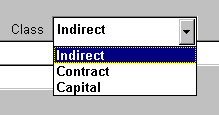
DataLoad cell containing \i would select Indirect
DataLoad cell containing \c would select Contract
DataLoad cell containing \cc would select Capital
Q. Why don't my mouse clicks work using the *ml & *MR commands?
A. Ensure that the screen coordinates are set correctly for these commands. This is described on the commands page.
Q. How do we use the *CW() command?
A. The *CW() command is used to change the active window on the PC. It does not change the active form within an application as is sometimes believed. The name of the new target window must be inserted between the () after *CW and DataLoad will make this the active window when the command is processed and hence it will now receive data sent by DataLoad.
Q. When the load is started the first 1 or 2 fields are missed but this only happens at the start, why?
A. This appears to be an Oracle Forms issue. The load will need to include a workaround for this, such as by increasing the DataLoad delays or adding keystrokes at the start of the load to compensate for this.
Q. Why doesn't the Oracle pick list respond when data is sent to it?
A. Data must be sent to pick lists as keystrokes, not the default DataLoad copy and paste. Prefix data with a \ (backslash) to force DataLoad to simulate keystrokes.
Q. I have a large amount of data that I need to send as keystrokes, not using Copy & Paste. How can I quickly prefix this data with the necessary '\'?
A. DataLoad has functionality to change single or multiple cells to & from keystroke and Copy & Paste cells. Use "Convert To" from the Edit or grid pop-up menus to access this functionality. See Convert To.