|
Home |  |
Using DataLoad | |
Macro Loads | |
Browser Control | |
Forms Playback |  |
Scripting | |
Problems |  |

 Windows char set used by default Unicode UTF8 compatibility
options All Oracle characters sets supported
Windows char set used by default Unicode UTF8 compatibility
options All Oracle characters sets supported Different "character sets" exist to support different languages while the Unicode character set supports all languages. Your Oracle E-Business Suite system will use one character set and it is important that DataLoad saves Forms Playback files in this character set. To enable this DataLoad supports all characters sets available for use in Oracle E-Business Suite.
By default DataLoad saves files in the non-Unicode (also known as ANSI) "character set" which is the default on your PC. If your Oracle database does not use Unicode UTF8 then DataLoad's default will probably be compatible with Oracle; that is, both character sets will represent your local characters in the same manner. However, the DataLoad character set can be changed to ensure it is compatible with Oracle. Furthermore, this must be done if your database uses Unicode because some characters will be stored differently in Oracle compared to your local PC character set.
How to determine your database's character set. You could ask your Oracle E-Business Suite DBA and he or she will definitely know this. However, you can also identify the character set from within Oracle E-Business Suite. Select "About Oracle Applications..." from the "Help" menu; scroll down to a section called "Forms Server Environment Variables" then continue to scroll down until you find a line which starts with "NLS_LANG". The value on the remainder of the line will be of a similar format to the following:
American_America.WE8ISO8859P1
That is, Language_Terriroty.CharacterSet. The final part of this value, after the '.', is the character set. The DataLoad characters set must be compatible with that character set.
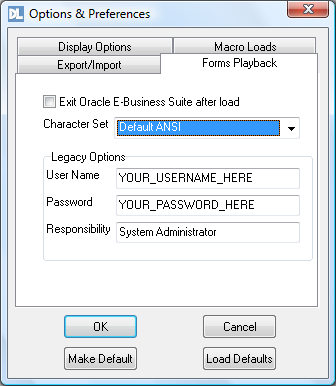
The DataLoad character set is selected on the Forms Playback tab of the Options dialog box, which is access from the Tools menu. Whereas most options only refer to the current file this setting remains set for all files until you change it again . Therefore, once set all files will be saved in the chosen character set. This option uses a drop list containing all supported character sets. The top 3 settings are the most commonly used options. Two are different types of Unicode UTF8 and the other is Default ANSI. If the Oracle database uses UTF8 then the correct UTF8 character set must be selected. If Default ANSI is selected the PC's ANSI character set is used and this is usually compatible with the Oracle character set if the database does not use UTF8. However, beneath these 3 options are listed all ANSI character sets supported in Oracle and the correct character set may be selected instead of using Default ANSI.