|
Home |  |
Using DataLoad |  |
Macro Loads | |
Browser Control | |
Forms Playback | |
Scripting | |
Problems |  |

 Delimited text data can be imported into DataLoad
Data from external sources can be easily imported in to DataLoad. This data may come from an open Excel spreadsheet or from a delimited text file. These two data import options are described below.
DataLoad can import data from a spreadsheet currently open in Excel. The data will be inserted in to the active DataLoad spreadsheet at the currently selected cell. This import is started by clicking on the Excel icon on the DataLoad toolbar or by selecting the Tools -> Excel Import menu entry. DataLoad will either import all data from the Excel spreadsheet or can just import the selected data.
Whether all or just selected data is imported depends on the value of the Data Source option on the Export/Import tab of the DataLoad Options window. DataLoad can also start a Macro load immediately after importing this data. That option can be useful where the Macro load is to be held in an Excel spreadsheet, perhaps to allow Excel functions to be used, before it is executed by DataLoad. Whether a load is automatically started depends on the value of the Import Action option in the Export/Import tab of the Option window.
The data should be held in text file and columns/fields separated by a know character, e.g. a comma. Files using any delimiter can be processed by DataLoad and the data will be imported into the spreadsheet currently open in DataLoad.
To import data select 'Import Data' from the 'File' menu.
Next, select the file containing the data you want to import and click 'Open'.
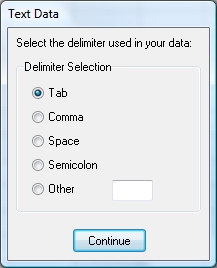
Having selected the file to open, the user is prompted to select the delimiter used in the file. The following window will appear:
If the file uses a Tab, Comma, Space or Semicolon as a delimiter then the relevant option should be selected, otherwise select Other and enter the delimiter used in the text box.
Click Continue and the contents of the spreadsheet will be replaced with the data contained in the file.
Note When data is imported into a spreadsheet the spreadsheet's existing data may be overwritten, but columns and rows beyond the imported data will not be affected.